
 100% written by human
UI5con 2026 took place on July 14th — and this one was special: it marked 10 years of UI5con 🎉. As every year, it was the best place to find out where UI5 and its tooling are actually heading — straight from the teams that build them.
Before diving into the announcements: I’m really glad I could be part of it again this year. UI5con is as much about the people as it is about the content — catching up with familiar faces from the community, putting faces to GitHub handles, and talking shop between the sessions is what makes this conference special. Thanks to everyone who organized it and everyone I got to chat with!
The keynote opened with some numbers that show how alive the framework is. Since the last UI5con: 12 minor releases, 22 patches, and roughly 6,800 commits from around 140 contributors — and that is OpenUI5 alone. That covers releases 1.138 through 1.150, the latter freshly published.
This is my personal recap: the announcements I consider relevant for day-to-day UI5 development, plus a few opinions. If you want the full picture, the complete main stage was recorded and is available on YouTube — I’ve embedded it at the end of this post.
UI5 CLI v5: Build Cache, Live Reload, Multi-Project Support
The biggest tooling announcement for me: UI5 CLI v5 — and it’s not just “on the way”, an alpha pre-release is already on npm (look for the next tag). Quick side note: what used to be called “UI5 Tooling” has officially been renamed to UI5 CLI, ending years of confusion between npm package names and product names.
The v5 pre-release ships three major features:
- Built-in live reload — via WebSocket, without extra middleware. Today you need something like
ui5-middleware-livereloadto get a decent edit-save-reload cycle. With CLI v5, the dev server handles this out of the box — and the new WebSocket-based approach fixes the performance and memory issues the old middleware approaches had. - A build cache — the biggest refactoring of the codebase in years. The new motto is “what you build is what you serve”: the dev server serves the actual build output, and when you change a file, only that file is rebuilt. Repeated builds reuse cached results instead of rebuilding everything — in the multi-component demo on stage, a rebuild that previously processed every project was nearly instant.
- The new component type for multi-project development. If you maintain several UI5 apps or components in one repository, you can now serve a root application with multiple components in a single setup — no more workarounds. If you have read my post on UI5 monorepos with pnpm workspaces, you know this pain first-hand; first-class support is very welcome (it also targets apps without their own HTML entry point, e.g. Work Zone scenarios).
And for everything the core doesn’t cover, the community ecosystem stays as strong as ever: Nico Schönteich demoed on stage how ui5-tooling-modules lets you pull any third-party npm package into a UI5 app — including a custom control rendering a 3D supermarket with three.js and a custom web component talking to a Bluetooth label printer. Live on stage, printer included.
New Built-In Debugging Tools (Since UI5 1.149)
Quietly shipped with UI5 1.149 (as an experimental feature for now): a new set of debugging tools that live directly in the framework — no browser extension required. They were first shown at one of the monthly UI5 live community events and got a spot in the keynote for good reason.
Getting to them is a two-step affair:
- Add the URL parameter
sap-ui-debug-tools=trueto your app. Alternatively, the classicsap-ui-debug=truenow enables the debug sources and the new tools in one go. - Open the browser console and run:
| |
The ui5 console object lists everything the tools can do — from ui5.control($0) to grab the UI5 control behind a DOM node, to ui5.spy() for function calls, to routing traces and theming parameters:
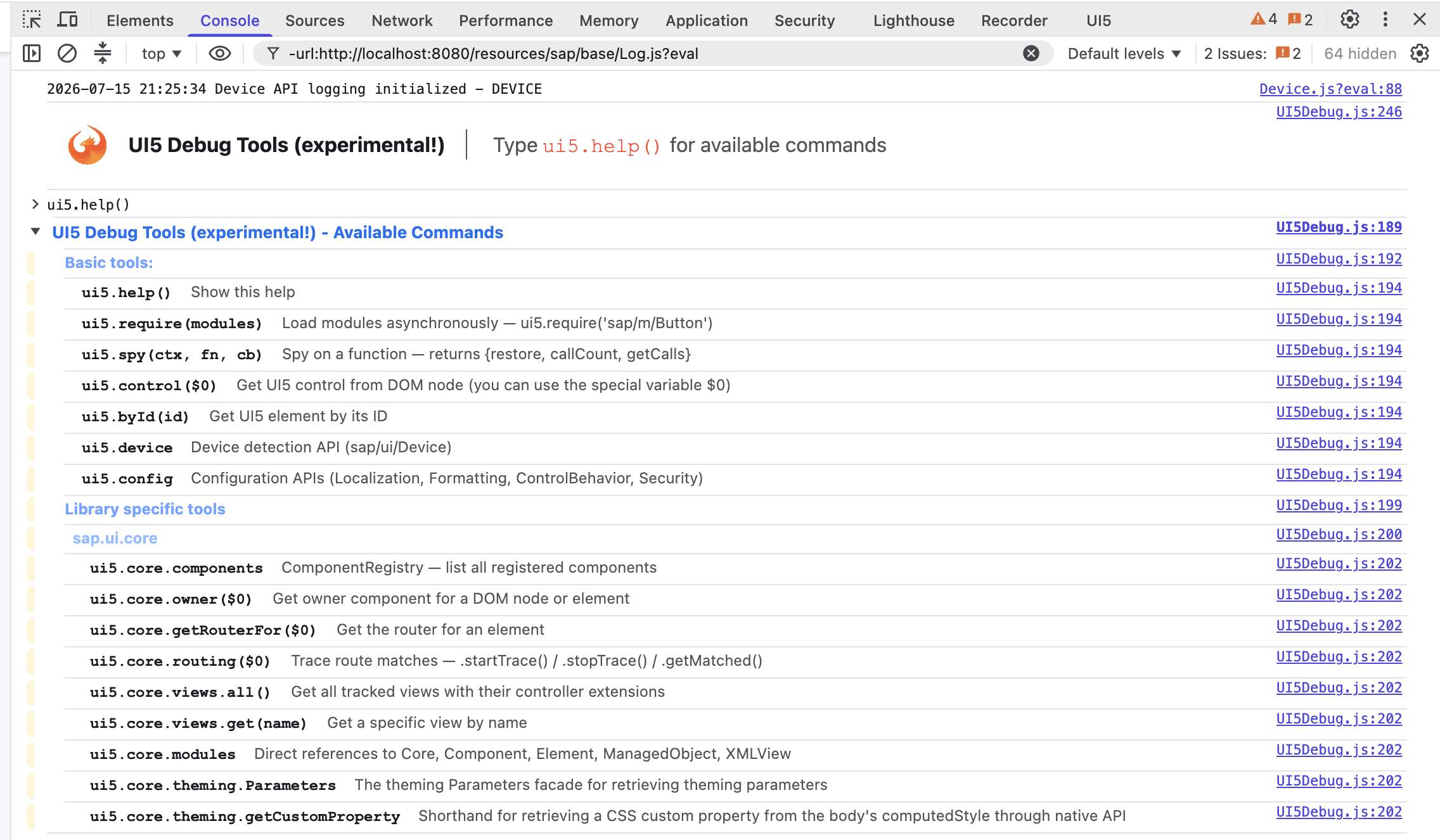
ui5.help() in action — the new debug tools listing their commands in the console
The feature is documented in the SAPUI5 SDK — Demo Kit, and it is worth ten minutes of exploration — being able to inspect a running app on any system just by appending a URL parameter is a big deal for support situations, where installing the UI5 Inspector extension is often not an option.
Best Practices: TypeScript, UI5 Linter — and AI
One session walked through the current recommended setup for UI5 development, and the reassuring news is: if you are on TypeScript with UI5 linter in your pipeline, you are already exactly where SAP wants you to be.
One caveat worth knowing: UI5 linter focuses on the latest UI5 versions. Its rules are geared toward flagging deprecated APIs and preparing your code for what comes next — so the older the UI5 version you target at runtime, the more its findings describe your future migration rather than your current reality. Still: running it early means fewer surprises later.
AI Tooling: MCP Servers, Coding-Agent Plugins and Modernization
AI had a prominent spot on the main stage this year — and unlike a lot of AI conference content, most of it was genuinely practical.
On the UI5 side, SAP now ships UI5 plugins for coding agents, available directly in the plugin marketplaces of Claude Code and GitHub Copilot. The one that impressed me most is the modernization plugin. The idea is simple: instead of manually working through an old codebase, you run one command and let the agent do the cleanup — with UI5 linter as the source of truth. The agent starts with the linter’s deterministic autofixes, then takes on the deeper transformations the linter can only flag, runs the linter again to check its own work, and commits after each phase so you can always roll back. That feedback loop is exactly what makes AI-assisted UI5 development trustworthy instead of a gamble.
And it works: SAP showed results from real S/4HANA applications where the vast majority of linter findings were fixed fully automatically. What’s left over is mostly the sync-to-async migrations — actual behavior changes that an AI can’t safely judge without knowing the business context. Fair enough. The plugin takes care of the repetitive bulk, your judgment covers the rest.
On the Fiori side, the SAP Fiori MCP server gives agents what they otherwise lack: knowledge of the Fiori and UI5 documentation, your project structure, and the OData services behind it — which finally makes generating Fiori Elements apps reliable instead of hallucination-prone. It ships with a set of skills (creating FE apps, adding charts, generating OPA tests, and so on) and comes bundled as a Claude Code plugin: one install, no configuration. In the on-stage demo, a single natural-language prompt added a working analytical chart to a CAP travel app.
And one AI session was so remarkable that it deserves its own section.
UI5 Has Entered the Chat: AI, MCP Apps and UI5
The talk “UI5 has entered the chat – AI, MCP Apps and UI5” by Marian Zeis and Mike Zaschka was one of the most impressive contributions of the conference — a real showcase of what is already possible with AI today.
The project they presented builds UI5 apps in real time while you interact with the AI: you chat, and the assistant doesn’t just answer in text — it assembles a live UI5 app on the fly, renders it directly in the conversation, and lets you interact with it right there. This is not a code generator that hands you something to deploy later; the app appears and runs directly inside the chat, powered by MCP Apps.
The source code is available on GitHub: marianfoo/UI5con_2026_MCPApps.
My take: mega interesting, and technically hard not to be impressed by. Where exactly this will land in everyday business scenarios is still an open question — but that’s normal for technology this new, and honestly part of the fun. Someone has to explore the territory before the use cases become obvious, and Marian and Mike are doing exactly that. I’m curious to see where they and the community take it from here — this talk alone was worth the trip.
JSX: Type-Safe Views — Available Today as an Incubation Project
One of the keynote’s real announcements: a JSX runtime for UI5, released as an incubation project in the UI5 community organization on GitHub. You can install it and write your first JSX view today.
What is JSX, and why should a UI5 developer care?
JSX is a syntax extension for JavaScript (popularized by React) that lets you write UI markup directly inside your code — and in the TypeScript variant, TSX, that markup is fully understood by the compiler. For UI5, this means an alternative way to write views: instead of an XML file that lives next to your controller, the view is TypeScript.
And that closes the last big gap in the UI5 TypeScript story. TypeScript has covered controllers, custom controls, and models for years now — but XML views remain plain strings to the compiler. A typo in a control name, a wrong property, a binding to a non-existent event handler: none of it surfaces before runtime. With JSX views, the compiler checks every control, property and handler reference — Peter Müßig’s live demo showed exactly that: typing an <Input> tag brought up code completion for all its properties, and wiring this.byId(...).getValue() to a message was fully typed end to end.
How it works
There is not much magic involved — your project needs exactly two pieces:
- At build time, the standard Babel plugin
transform-react-jsxconverts the JSX markup into plain function calls — the same mechanism the whole JSX ecosystem uses. - At runtime, the lightweight UI5 JSX runtime turns those function calls into regular UI5 control constructor calls.
No new rendering engine, no parallel component model — under the hood it’s the same UI5 controls you use today, just declared in a type-safe way.
According to Peter Müßig, this is going to be an interesting topic in the near future and one to keep an eye on — there is still quite a bit happening in this area. The team was explicit about the deal: it’s an incubation project, and if it gets enough positive feedback, it will be brought into the standard. So if type-safe views matter to you (they should), try it out and hit the feedback button — this is the part of the roadmap I’m personally most excited about.
A New Fiori Launchpad Sandbox
If you have ever set up a local launchpad sandbox, you know the dirty secret: the classic local sandbox is based on an old launchpad version that new customer systems don’t even run anymore. You develop against a shell that behaves differently from what your users get.

Every local FLP setup until now
That finally changes:
- A new launchpad sandbox was presented, aligned with what current systems actually run.
- Configuration happens via simple config files or a middleware — no more hand-crafted sandbox HTML pages.
- It ships as experimental with UI5 1.150.
As with all experimental features, expect the configuration format to change before it stabilizes. For production-like testing today, the classic sandbox (pinned to a fixed patch version) remains the pragmatic choice — like in my monorepo setup.
For everyone building launchpad plugins or testing tile navigation locally, this is the announcement that will pay off first in day-to-day work.
Customize Fiori Elements Apps
Mixing freestyle UI5 and Fiori Elements: it was shown how a freestyle app can host full Fiori Elements pages by redefining the routing targets — e.g. keeping a custom main view and using a metadata-driven FE object page as the detail view (extend sap/fe/core/AppComponent, adjust the target view paths, done). You get FE gifts like draft handling for free, exactly on the pages where they fit. A nice middle ground between “pure FE” and “rewrite as freestyle”.
Bonus: A UI5con Neovim Theme
My favorite side note had nothing to do with roadmaps: Nico Schönteich built a custom Neovim theme just for this year’s UI5con — and presented his demos live on stage in a terminal dressed head to toe in UI5con colors, phoenix included.
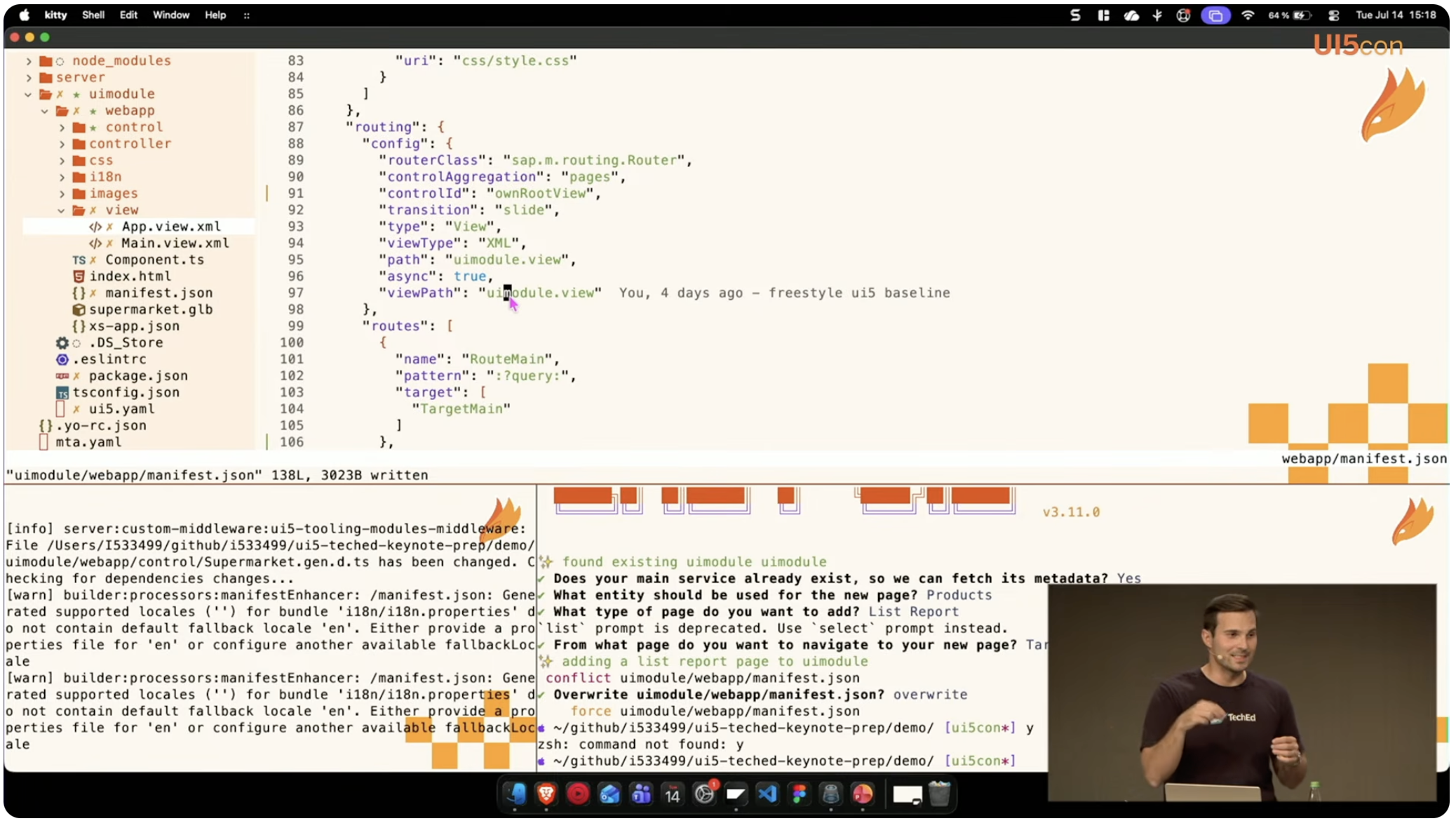
Nico Schönteich’s custom UI5con Neovim theme in action on the main stage
The setup is open source and part of his dotfiles: github.com/nicoschoenteich/dotfiles.
And for the real hardcore programmers among you: I can only recommend giving Neovim a try 😄
No UI5 2.0 — For Now
And the elephant in the room: UI5 2.0 is on hold. The 1.x line continues.
The reasoning, straight from the Q&A, is more interesting than the headline. The team could ship 2.0 — the legacy-free groundwork is essentially done, and the migration tooling reaches 95%+ automation. But their honest assessment: a legacy-free 2.0 is cleaner, yet not fundamentally different — and in the AI era it wouldn’t solve any new problems. Instead of maintaining two codebases for an incremental step, they’d rather take the time to figure out what a genuinely bigger step should look like (generative UI, agent-to-UI protocols, JSX all point in that direction).
The Recording: Live from the Main Stage
The full main stage — UI5con 2026: Live from the Main Stage! — is available on YouTube:
Conclusion
UI5con 2026 was less about flashy reinventions and more about removing friction: a CLI with build cache and live reload built in, debugging that needs no extension, type-safe JSX views you can try today, a sandbox that matches reality, and AI tooling that checks its own work with the linter. Add the clear commitment to the 1.x line, and the message to UI5 teams is a reassuring one: keep building on what you have — it only gets better from here, no rewrite required.
See you next year — the phoenix keeps rising 🔥
Frequently Asked Questions
Where can I watch the UI5con 2026 sessions?
How do I try the new debugging tools?
sap-ui-debug-tools=true to your app’s URL (or sap-ui-debug=true to also load the debug sources), then run ui5.help() in the browser console to see what’s available. Note that the tools are experimental for now, so details may still change.