
 100% written by human
In an interconnected enterprise runtime, SAP is no longer an isolated platform. Modern business processes rarely live inside a single system — they span many cloud services, external partners, and third-party tools. To make them work together, systems need to talk to each other, and the language they use is HTTP.
Why do we need HTTP calls?
Almost every service on the internet exposes its functionality through a REST API (a set of web addresses you can call over HTTP). This is fantastic for us as ABAP developers: if a system offers a REST API, we can connect to it directly from our ABAP code. And the two data formats these APIs speak are almost always JSON (the modern standard) or XML (the classic, still common in SAP-to-SAP and SOAP scenarios) — exactly the two formats we will learn to handle in this guide.
This becomes especially powerful on the SAP Business Technology Platform (BTP). BTP is where companies centrally bring everything together in the cloud — connecting their S/4HANA backend, cloud services, and countless external systems in one place. HTTP calls are the glue that makes this central integration possible.
Real-world business examples
Here are just a few things you could build with HTTP calls from ABAP:
- Project management (Jira, Azure DevOps): Automatically create a Jira ticket when a quality issue is posted in SAP, or update the SAP order status when a Jira issue is closed.
- Communication (Microsoft Teams, Slack): Send a Teams or Slack notification the moment a critical sales order or a failed payment is detected.
- Finance & rates: Fetch real-time currency exchange rates or stock prices from an external financial API.
- Logistics (DHL, UPS): Request live shipment tracking data and show it directly on the SAP sales order.
- CRM & Marketing (Salesforce, HubSpot): Keep customer data in sync between SAP and your CRM system.
- AI services: Send a text to an AI service (like translation or sentiment analysis) and process the JSON response.
But how do HTTP requests actually work? What are headers and cookies, and how do we manage them? And how can you easily convert ABAP data objects into JSON or XML (and vice versa)?
In this guide, we break these concepts down into simple, practical terms. We will start with an easy-to-understand waiter analogy, examine the role of headers and cookies, and dive straight into ready-to-use code examples utilizing modern ABAP and inline declarations.
We will send and receive a lot of JSON and XML below. If their syntax still looks unfamiliar, spend five minutes on the basic structure first — it makes everything that follows much easier to read:
- JSON structure: json.org — the official reference (objects, arrays, key-value pairs)
- XML structure: W3Schools — XML introduction (elements, tags, nesting)
1. Deconstructing an HTTP Request (The Waiter Analogy)
To understand HTTP communication, imagine dining at a restaurant. There are four primary actors:
- The Guest (Client): You (or your ABAP program) wanting to request something.
- The Order (Request): Your message outlining what you want.
- The Waiter (HTTP Client): The messenger carrying your order to the kitchen and bringing the food back.
- The Kitchen (Web Server / API): The backend processing your request and preparing the response.
Core Anatomy of a Request
Every HTTP request is made up of a few simple building blocks. Using our restaurant analogy, here is what each part means:
- The URL (Endpoint Address): The street address or table location that tells the waiter where to deliver your order (e.g.,
https://api.example.com/v1/products). - The Method (The Verb): The action you want to perform — get something, create something, change something, or delete something (see the table below).
- The Headers (Extra Instructions): Small notes attached to your order, such as “I only accept JSON” or “here is my membership card” (more on this in Section 2).
- The Query Parameters (Filters): Optional add-ons in the URL that refine your request, like “only bring me desserts under 10€” (e.g.,
?userId=1&status=open). - The Body (The Payload): The actual content you send along, for example the details of a new order. Usually only needed for
POST,PUT, andPATCH.
HTTP Methods (The Active Verbs)
To define what action we want the server to perform, we use specific HTTP methods. Here is how they map to our restaurant analogy and database operations:
| HTTP Method | Restaurant Analogy | Database Action (CRUD) | Description |
|---|---|---|---|
GET | “Bring me the menu” or “Serve the soup” | Read (Retrieve) | Fetches existing resource details from the server without modifying anything. |
POST | “Place a new custom order” | Create (Insert) | Submits new data payloads to the server to create a brand new resource. |
PUT / PATCH | “Replace my steak with fish” / “Add extra pepper” | Update (Modify) | Overwrites a resource entirely (PUT) or updates specific fields (PATCH). |
DELETE | “Cancel my order” / “Take away the empty plate” | Delete (Remove) | Permanently deletes a specific resource from the server. |
This entire interaction is mapped in the Mermaid sequence diagram below:
sequenceDiagram
    autonumber
    actor Guest as Guest (ABAP Client)
    participant Waiter as Waiter (HTTP Client)
    participant Kitchen as Kitchen (Web Server)

    Note over Guest,Kitchen: The HTTP Request-Response Lifecycle

    Guest->>Waiter: 1. Place order (HTTP Method, URL, Headers, Body)
    activate Waiter
    Waiter->>Kitchen: 2. Carry order to kitchen (Send Request)
    activate Kitchen
    Note over Kitchen: Process payload,
Query DB, Compute
    Kitchen-->>Waiter: 3. Return prepared dish (HTTP Response: Status 200 + Payload)
    deactivate Kitchen
    Waiter-->>Guest: 4. Deliver dish to table (Receive & process response)
    deactivate Waiter
2. Understanding Headers and Cookies
When communicating over HTTP, the request and response do not just consist of raw payloads. They also contain metadata: Headers and Cookies.
What are HTTP Headers?
Headers are key-value pairs sent in both requests and responses. Think of request headers as your “special dining instructions” or “ID verification” when placing an order:
Accept: application/json: Telling the kitchen, “I only understand JSON. Please serve my data format accordingly.”Content-Type: application/json; charset=utf-8: Telling the kitchen, “The payload body I am handing over is written in UTF-8-encoded JSON.”Authorization: Bearer <token>: Your exclusive membership card allowing you access to VIP dining areas.
What are Cookies?
Cookies are small pieces of stateful data that a server sends to your client via a response header (Set-Cookie). Your client then stores them and automatically attaches them to subsequent outgoing requests (Cookie header).
Think of cookies as a physical cloakroom ticket the restaurant hands you on your first visit:
- On your response, the waiter says: “Keep this ticket locally.” (
Set-Cookie: session_id=XYZ123) - On your next request, you automatically show that ticket back to the waiter: “Remember me? Here is my ticket.” (
Cookie: session_id=XYZ123) - This is crucial for Session Management, keeping track of logged-in states, or preserving user preferences across stateless HTTP calls.
3. Understanding Status Codes (Did the Order Work?)
After the kitchen processes your order, the waiter always comes back with a short status message telling you whether everything went fine. In HTTP, this message is a three-digit status code. As a beginner, you only need to remember the five families:
| Range | Meaning | Restaurant Analogy | Common Examples |
|---|---|---|---|
1xx | Informational | “I’m working on it, please wait.” | 100 Continue |
2xx | Success ✅ | “Here is your dish, enjoy!” | 200 OK, 201 Created, 204 No Content |
3xx | Redirection | “That dish moved to another table.” | 301 Moved, 304 Not Modified |
4xx | Client Error ❌ | “You made a mistake in your order.” | 400 Bad Request, 401 Unauthorized, 403 Forbidden, 404 Not Found |
5xx | Server Error 🔥 | “The kitchen broke down.” | 500 Internal Server Error, 503 Service Unavailable |
A quick way to remember: 2xx = good news, 4xx = your fault (fix your request), 5xx = their fault (the server has a problem). Always check the status code before trusting the response body!
4. Understanding Where to Send Requests (URLs vs. Destinations)
In the examples below we use create_by_url( ) with a full URL. This is perfect for learning and quick tests. But in real projects, hard-coding URLs, users, and passwords into your code is a bad idea — if the endpoint changes, you would have to modify and re-transport your program.
Instead, SAP lets you store connection details (URL, authentication, certificates) outside your code in a reusable configuration:
- On-Premise: Use an RFC Destination (transaction
SM59) and connect withcl_http_destination_provider=>create_by_destination( ). - SAP BTP / S/4HANA Cloud: Use a Communication Arrangement and connect with
cl_http_destination_provider=>create_by_comm_arrangement( ).
Use create_by_url( ) while experimenting, but switch to a Destination or Communication Arrangement for anything that goes to production. It keeps secrets out of your code and is fully Clean Core-compliant.
5. Try the API First: DummyJSON & Postman
Before we write a single line of ABAP, it pays to know what our target looks like and to poke at it by hand. Throughout this guide we call a free, public test API called DummyJSON.
DummyJSON is a fake REST API that serves realistic sample data — users, posts, carts, products, and todos — over HTTPS. It needs no sign-up and no API key, and its add/update/delete endpoints only simulate writes: they return a proper response with a freshly generated id but never actually persist anything. That makes it perfect for safe experimentation. In this guide we mostly work with todos, but you can swap in products (or users, posts, …) the exact same way.
👉 Full endpoint list and response schemas: dummyjson.com/docs
A single todo from DummyJSON looks like this:
| |
The endpoints we will use below:
| Purpose | Method | Endpoint |
|---|---|---|
| Get all todos | GET | https://dummyjson.com/todos |
| Get a single todo | GET | https://dummyjson.com/todos/1 |
| Create a todo | POST | https://dummyjson.com/todos/add |
| Get all products | GET | https://dummyjson.com/products |
| Get a single product | GET | https://dummyjson.com/products/1 |
Test it in Postman before writing any ABAP
When you integrate a new API, resist the urge to jump straight into ABAP. First fire the request by hand with a REST client like Postman — a free desktop app for sending HTTP requests and inspecting the raw response. This lets you confirm the URL, headers, and payload actually work before you start debugging them inside SAP, where every round-trip is slower.
Trying our first call takes less than a minute:
- Download and install Postman (free).
- Set the method to
GETand the URL tohttps://dummyjson.com/todos. - Hit Send and inspect the JSON that comes back.
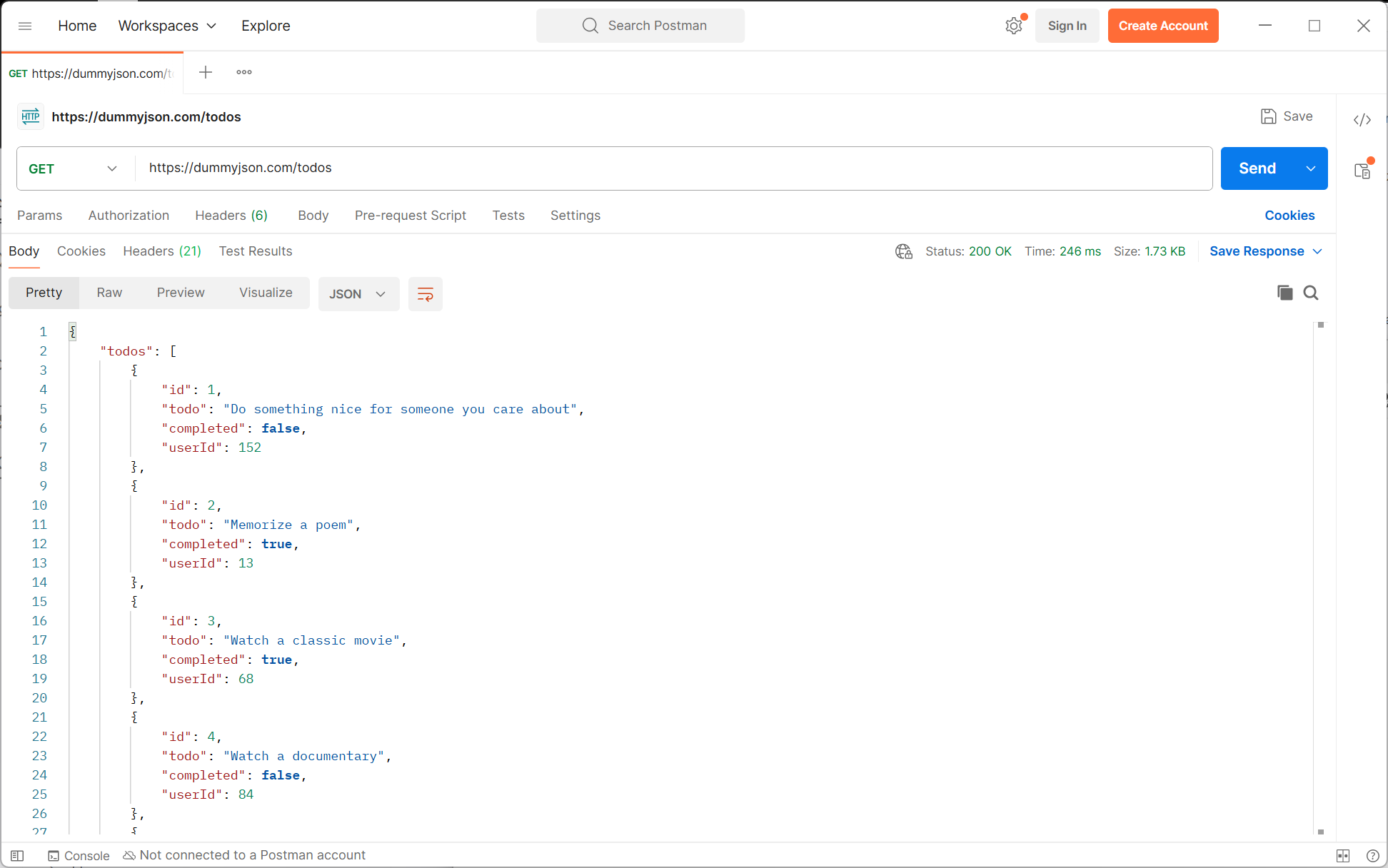
As the screenshot shows, Postman confirms a green 200 OK status and pretty-prints the response body: an object with a todos array, where each entry has exactly the id, todo, completed, and userId fields we listed above. That is the same payload our ABAP code will receive — so once the request behaves here, translating it into ABAP (which we do next) is almost mechanical: you already know exactly what to send and what to expect back.
Postman separates “is the API working?” from “is my ABAP working?”. If the call succeeds in Postman but fails in ABAP, the problem is on your side (headers, encoding, CSRF, certificates). If it fails in both, the problem is the request itself. That distinction saves hours of guessing.
6. Execution of HTTP Requests in ABAP
In modern ABAP instances (such as SAP S/4HANA Cloud or modern On-Premise systems), we use the IF_WEB_HTTP_CLIENT interface. It is the Clean Core-compliant successor to the legacy CL_HTTP_CLIENT class.
Here is an example demonstrating how to initialize a client, set headers, manage cookies, and retrieve a response:
| |
Network calls can hang forever if the other server is slow or unreachable. You can protect your program by setting a timeout before executing the request:
| |
7. Authentication (Proving Who You Are)
Most real APIs will not talk to anonymous strangers — you must prove your identity, just like showing an ID card or membership card at the restaurant. Here are the three most common ways, all set via a simple header:
1. Basic Authentication (username + password) The username and password are combined and Base64-encoded. ABAP can build this header for you:
| |
2. Bearer Token / OAuth 2.0 (a temporary access token) Very common for cloud APIs. You send a token you received earlier from a login/token service:
| |
3. API Key (a simple secret key) Some APIs just want a secret key in a custom header:
| |
Never hard-code passwords or tokens in your source code! Store them in a Destination or Communication Arrangement (see Section 4). SAP then adds the authentication automatically, and your secrets stay out of the code and out of transports.
8. Working with SAP OData Services (The CSRF Token)
If you call an SAP OData service and want to change data (POST, PUT, DELETE), there is one extra step that trips up almost every beginner: the CSRF token (pronounced “sea-surf”). It is a security check that prevents malicious websites from performing actions on your behalf.
The rule is simple and always the same:
- First, send a
GETrequest with the special headerX-CSRF-Token: Fetch. The server replies with a token. - Then, send your actual
POST/PUT/DELETErequest and include that token in theX-CSRF-Tokenheader.
| |
A 403 Forbidden error on an SAP OData POST/PUT/DELETE is almost always a missing or invalid CSRF token. Make sure you fetch the token first and reuse the same HTTP client (so the session cookie stays intact), otherwise the token will be rejected.
So far we have focused on consuming REST APIs. But what if you want to expose your own data as a REST/OData service in a modern environment like ABAP Cloud or SAP BTP? In the ABAP RESTful Application Programming Model (RAP), custom CDS views (CDS entities) are the go-to approach for building exactly these kinds of services.
👉 Learn how to build them in the dedicated guide: Building Custom CDS Entities with Unmanaged Queries in ABAP RAP
9. Handling JSON Payloads (The Modern Standard)
JSON (JavaScript Object Notation) is the de-facto data serialization standard for modern API endpoints. ABAP makes parsing and creating JSON extremely seamless using /UI2/CL_JSON combined with inline data declarations.
JSON Deserialization (JSON to ABAP)
Let’s parse incoming JSON data directly into an inline-defined ABAP structure without pre-creating global dictionary structures:
| |
JSON Serialization (ABAP to JSON)
Generating modern JSON structures out of internal ABAP objects is just as fast:
| |
Alternative for ABAP Cloud: the XCO Library
/UI2/CL_JSON is great and widely used, but it is not released for ABAP Cloud (e.g. on BTP or in S/4HANA Cloud Public Edition). There, SAP gives you the modern XCO library instead:
| |
On a classic On-Premise system, /UI2/CL_JSON is perfectly fine and offers convenient options. In ABAP Cloud, use XCO — it is the officially released, Clean Core-compliant option.
10. Handling XML Payloads (The Standard Classic)
For older legacy platforms, SOAP-based systems, or explicit SAP-to-SAP background messaging, XML is the typical vehicle. We manipulate XML using ABAP’s identity transformation: CALL TRANSFORMATION id.
XML Deserialization (XML to ABAP)
We want to parse the following hierarchical XML into a structured ABAP record:
| |
We do this easily using an inline structure:
| |
XML Serialization (ABAP to XML)
To wrap records back into an XML format:
| |
When simple ID mapping is insufficient for deeply nested schemas or advanced namespaces, you should create a dedicated Simple Transformation (ST) or XSLT object in Eclipse ADT and trigger it inside your CALL TRANSFORMATION statement.
11. Pro Tip: Wrap your HTTP Requests in a Helper Class
If you find yourself making HTTP requests in multiple places, writing boilerplate code to handle headers, cookies, query parameters, destinations, and clients gets repetitive and messy. Wrapping these calls into a clean, reusable utility class simplifies your application logic significantly.
Here is a robust helper class ZCL_HTTP_HANDLER that supports modern REST methods (GET, POST, PUT, DELETE), handles query parameter tables, tracks stateful headers/cookies, and manages client lifecycle cleanly:
| |
How to use the ZCL_HTTP_HANDLER Wrapper Class
Using this wrapper class makes your main business logic short, clean, and extremely readable. Here are practical examples demonstrating how to use it for different HTTP operations:
1. A Simple GET Request with Query Parameters
Instead of instantiating destinations, clients, and requests manually, you simply call the wrapper class:
| |
2. A Stateful POST Request with Headers and Cookies
If you need to pass authentication tokens, context headers, or cookies alongside a payload:
| |
12. Real-World Example: Creating a Jira Issue from ABAP
Let’s put everything together in a genuinely useful scenario — the very first one from our intro: automatically creating a Jira ticket when a quality issue is posted in SAP. This example builds directly on the ZCL_HTTP_HANDLER wrapper from Section 11 and calls the real Jira Cloud REST API.
How Jira wants the data
To create an issue, Jira expects a POST to /rest/api/3/issue with a JSON body where all fields live under a fields object. Here is how the pieces you asked about map to that contract:
| What you want to set | JSON path | Example value |
|---|---|---|
| Project | fields.project.key | "SAP" |
| Title | fields.summary | "Quality issue on production order 4711" |
| Issue type | fields.issuetype.name | "Task", "Bug", "Story" |
| Assignee | fields.assignee.accountId | "5b10ac8d82e05b22cc7d4ef5" |
| Priority | fields.priority.name | "High", "Medium", "Low" |
| Labels | fields.labels | ["sap", "integration"] |
| Description | fields.description | An ADF document (see the note below) |
- An API token — create one at id.atlassian.com. Jira Cloud authenticates with Basic Auth using your account e-mail + this token (never your password).
- The assignee’s account ID — in Jira Cloud you no longer assign by username but by a stable
accountId. You can look it up viaGET /rest/api/3/users/searchor from the user’s profile URL.
The sample class: ZCL_JIRA_CLIENT
This small class wraps authentication and payload building, so the calling program stays a one-liner. It reuses ZCL_HTTP_HANDLER internally — a nice example of composing small helpers.
| |
Using it: one clean call
With the class in place, creating a Jira task from anywhere in your SAP logic is short and readable:
| |
A successful run returns something like SAP-123 — the key of the freshly created Jira issue, ready to store back on your SAP document.
Since REST API v3, Jira no longer accepts a plain description string. It expects the Atlassian Document Format (ADF) — a JSON tree of doc → paragraph → text nodes. That is why our payload wraps the text in that little structure. For a single paragraph the snippet above is all you need; richer formatting (bold, lists, links) just adds more nodes.
This example builds the body from string literals so you can see the exact Jira contract. In production, remember two things:
- Escape user input: if
iv_summaryoriv_descriptioncan contain quotes or newlines, build the payload from an ABAP structure with/UI2/CL_JSONorXCO(Section 9) instead of concatenating strings, so the JSON stays valid. - Keep the token out of your code: store the Jira URL and API token in a Destination / Communication Arrangement (Section 4) rather than passing them as literals.
13. Troubleshooting: Common Beginner Errors
Even with perfect code, HTTP calls can fail for reasons outside your program. Here are the errors you will most likely run into — and how to fix them:
| Symptom | Likely Cause | How to Fix |
|---|---|---|
| SSL handshake failed / certificate error | The target server’s SSL certificate is not trusted by your SAP system. | Import the server’s certificate into transaction STRUST (SSL client PSE). This is the #1 reason HTTPS calls fail on-premise. |
403 Forbidden on POST/PUT/DELETE to SAP | Missing or invalid CSRF token. | Fetch the token first and reuse the same client (see Section 8). |
401 Unauthorized | Missing or wrong credentials/token. | Check your Authorization header or the Destination configuration (Section 7). |
| Program hangs forever | The remote server is slow or unreachable. | Set a timeout with set_timeout( ) (Section 6). |
| Garbled special characters (é, ü, …) | Wrong encoding. | Make sure you send/read UTF-8 and set Content-Type: application/json; charset=utf-8. |
When calling an HTTPS endpoint, your SAP system must trust the remote server. If the certificate (or its root/intermediate certificate) is not in STRUST, the connection is refused before any data is sent. Ask your Basis team to import the certificate chain into the SSL Client (Standard) PSE — this solves the vast majority of HTTPS connection problems.
Summary & Integration Best Practices
By following these fundamental practices, you write clean, reliable integration logic every time:
- Use the modern
IF_WEB_HTTP_CLIENTAPI: It is secure, decoupled, and Clean Core-compliant — the successor to the legacyCL_HTTP_CLIENT. - Keep secrets out of your code: Use Destinations (
SM59) or Communication Arrangements (BTP) instead of hard-coding URLs, users, and passwords. - Always check the status code: A
2xxmeans success. Never trust the response body before you have confirmed the status. - Handle the CSRF token for SAP OData: Fetch it first, then send it back with every change request.
- Use inline declarations: Declaring data containers and target records directly in your (de)serialization blocks keeps your code clean and free of redundant Dictionary overhead.
- Pick the right JSON tool:
/UI2/CL_JSONon classic On-Premise,XCOin ABAP Cloud. - Always wrap calls in
TRY-CATCH: Network calls, timeouts, and corrupted payloads will happen — defensive code keeps your jobs from crashing. - Reuse a helper class: A small wrapper like
ZCL_HTTP_HANDLERremoves boilerplate and makes your business logic short and readable.
Frequently Asked Questions
How do I make an HTTP request in modern ABAP?
IF_WEB_HTTP_CLIENT interface. Create a client with cl_web_http_client_manager=>create_by_http_destination( ), configure the request (headers, body, query parameters), call execute( ) with the desired method (get, post, put, delete), and read the response. It is the Clean Core-compliant successor to the legacy CL_HTTP_CLIENT class.What is the difference between CL_HTTP_CLIENT and IF_WEB_HTTP_CLIENT?
CL_HTTP_CLIENT is the older, legacy HTTP client. IF_WEB_HTTP_CLIENT is the modern, secure, and Clean Core-compliant API available in SAP S/4HANA and ABAP Cloud. For any new development you should always use IF_WEB_HTTP_CLIENT.Which class should I use to parse JSON in ABAP?
/UI2/CL_JSON is convenient and widely used. In ABAP Cloud (BTP or S/4HANA Cloud Public Edition), /UI2/CL_JSON is not released — use the modern XCO library (xco_cp_json) instead, which is the officially released, Clean Core-compliant option.Why does my ABAP OData POST request return a 403 Forbidden error?
403 Forbidden on an SAP OData POST, PUT, or DELETE almost always means a missing or invalid CSRF token. First send a GET request with the header X-CSRF-Token: Fetch to obtain a token, then send it back in the X-CSRF-Token header of your change request — and make sure you reuse the same HTTP client so the session cookie stays valid.How do I fix SSL handshake or certificate errors when calling an HTTPS API?
STRUST under the SSL Client (Standard) PSE. Missing certificates are the number one reason HTTPS calls fail on-premise.How do I send authentication credentials with an ABAP HTTP request?
Authorization header: use Basic with Base64-encoded user:password for Basic Auth, Bearer <token> for OAuth 2.0, or a custom header like X-API-Key for API keys. In production, store credentials in a Destination (SM59) or Communication Arrangement instead of hard-coding them, so SAP adds authentication automatically and secrets stay out of your code.Should I use JSON or XML for ABAP integrations?
/UI2/CL_JSON or XCO, and XML with CALL TRANSFORMATION id.How do I create a Jira issue from ABAP?
POST to the Jira Cloud REST API endpoint /rest/api/3/issue with a JSON body containing a fields object (project.key, summary for the title, issuetype.name, assignee.accountId, priority.name, and a description in Atlassian Document Format). Authenticate with Basic Auth using your Atlassian e-mail plus an API token from id.atlassian.com. Jira returns 201 Created with the new issue key (e.g. SAP-123). See the ZCL_JIRA_CLIENT sample class in Section 12 for a complete implementation.